Learn how to view Turnitin similarity report before submitting. Understand scores, interpret colors, and check your paper safely before final submission.
Why Check Your Turnitin Similarity Report Early
You have spent days researching and writing. Now you face the submission button with hesitation. What if your similarity score comes back higher than expected? What if you accidentally missed a citation? This is exactly why you should view Turnitin similarity report before submitting your final draft.
Most students treat Turnitin as a final gatekeeper. They submit, cross their fingers, and hope for the best. That approach wastes opportunities. When you check your work early, you gain time to fix citation errors, improve paraphrasing, and address any accidental text matches. You transform Turnitin from a detection tool into a learning resource.
Understanding how to access and interpret these reports puts you in control of your academic integrity. You can spot problems while they are still fixable, not after your instructor has already graded the submission.
How to View Your Similarity Score on a Turnitin Assignment
Your first step involves locating where your institution hosts the Turnitin interface. Most universities integrate Turnitin directly into their Learning Management Systems like Canvas, Blackboard, or Moodle. Others use the standalone Turnitin website.
Step-by-Step Process
Log into your course platform and find your assignment. Click the assignment title to open the submission page. Look for a section labeled “Submission Details” or “View Report.” If you have already uploaded a draft, you will see a percentage displayed in the similarity column.
Click that percentage. A new window opens showing your Turnitin similarity report. This interface displays your document with color-coded highlights. Each color represents text that matches sources in Turnitin’s database. The sidebar lists specific sources and match percentages.
Sometimes you will see a clock icon or the words “Turnitin similarity report in progress.” This means the system is still comparing your text against billions of web pages, academic journals, and previously submitted papers. Processing usually takes five to ten minutes, though large documents or peak submission times can extend this to twenty-four hours.
What If Your Turnitin Similarity Report Is In Progress?
Patience becomes necessary here. The system works through an enormous database containing over ninety billion web pages and academic works. If your report shows as processing, do not panic. Wait fifteen minutes, then refresh the page.
Resubmitted papers trigger a specific delay. Turnitin automatically imposes a twenty-four hour waiting period after your third submission to prevent students from gaming the system by changing words incrementally. This delay allows the database to update properly and prevents your new draft from matching against your previous upload.
Can Students Check a Paper in Turnitin for Similarity Before Submitting?
Many students ask: can students check a paper in Turnitin for similarity without it counting as their final submission? The answer depends on your instructor’s settings.
Some professors create “draft” or “pre-check” assignments specifically for this purpose. These assignments scan your work and generate reports without storing the paper in Turnitin’s permanent student repository. You submit, review the feedback, revise your work, then submit to the final assignment folder.
If your course lacks a draft option, you have alternatives. Microsoft Word offers Turnitin Draft Coach, an add-in that checks similarity directly within your document. This tool gives you three similarity checks per document, allowing you to identify matches before uploading to your formal assignment. Ask your institution if they subscribe to this service.
Another option involves submitting early to the main assignment if resubmissions are allowed. Most standard Turnitin assignments permit three resubmissions before the due date. After your initial upload generates a report, you can view the results, make corrections, and upload again. The new version overwrites the old one.
Understanding Your Similarity Report Check Results
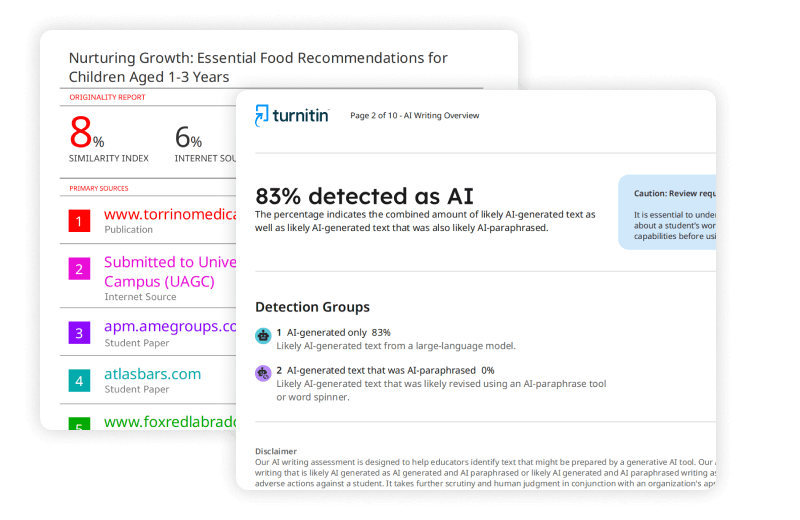
Once you access your report, you will see a percentage score and a colored icon. Many students obsess over these numbers without understanding what they actually represent.
Reading the Percentage Colors
Turnitin uses a color system to indicate similarity ranges:
- Blue (0%): No matching text found. While this seems ideal, it sometimes indicates insufficient source integration, especially in research-heavy papers.
- Green (1-24%): Low similarity. Most properly cited papers fall here. This range generally indicates healthy use of sources balanced with original writing.
- Yellow (25-49%): Moderate similarity. Papers in this range need review. You might have excessive quoting or incomplete paraphrasing.
- Orange (50-74%): High similarity. This suggests substantial matching text. Expect to revise significantly unless your assignment specifically requires extensive quoted material.
- Red (75-100%): Very high similarity. This usually indicates serious issues with originality or potential academic misconduct.
What the Numbers Actually Mean
The percentage represents the portion of your text that matches sources in Turnitin’s database. A twenty percent score means one-fifth of your submitted words appear elsewhere in their system.
However, context matters significantly. Turnitin flags properly cited quotations just as aggressively as uncited copying. Your reference list also counts toward the total. Many instructors configure settings to exclude bibliographies and quoted material, but not all do.
Blue and Green Scores (0-24%)
Scores below twenty-five percent generally satisfy most instructors. However, a zero percent score can signal problems. Research papers should engage with existing scholarship. If Turnitin finds no matches, you might have failed to include necessary citations or evidence.
Green scores indicate you have balanced source use with original analysis. Review any highlighted sections to confirm they represent proper citations rather than missed attribution.
Yellow Scores (25-49%)
This middle range triggers mixed reactions. Some instructors accept thirty percent similarity for literature reviews or papers analyzing specific texts that require extensive quoting. Others want revisions for anything over twenty percent.
Check the match breakdown. Click individual sources in the sidebar to see exactly what text triggered the flag. If the matches come from your bibliography or properly formatted quotes, you likely need no changes. If they come from body paragraphs without quotation marks, you need to paraphrase or cite.
Orange and Red Scores (50-100%)
Scores above fifty percent demand immediate attention. These indicate half or more of your submission matches existing sources.
Common causes include:
- Copying from Wikipedia or study guides without attribution
- Using paper mill templates or essay banks
- Submitting work previously uploaded by another student
- Excessive copy-pasting from research articles
Before rewriting, examine the report carefully. Sometimes technical papers with standard formulas or legal documents with boilerplate language trigger high similarity despite being original work. If your paper falls into these categories, speak with your instructor before panicking.
Is There a Safe Similarity Percentage in Turnitin?
Students constantly search for the magic number. Is ten percent safe? Is twenty percent too high? The truth frustrates many: there is no universal safe similarity percentage in Turnitin.
Universities set different thresholds. Some nursing programs accept up to thirty percent because medical terminology creates unavoidable matches. Creative writing programs might expect under five percent because original expression matters most. Engineering programs often see higher scores due to standardized technical descriptions.
Your syllabus or assignment instructions should specify expectations. If they do not, ask your instructor directly. Do not assume that lower is always better. A three percent score on a literature review suggests you ignored existing research. A twenty-five percent score with proper citations indicates healthy academic engagement.
Context Matters More Than Numbers
A paper with fifteen percent similarity containing one uncited paragraph presents more academic integrity risk than a paper with thirty percent similarity where every match is properly attributed. Instructors review the actual highlighted text, not just the headline number.
They examine whether you have synthesized sources or merely copied them. They check if quotation marks appear where needed. They assess if your paraphrasing truly transforms the original meaning or just swaps a few synonyms.
When Higher Scores Are Acceptable
Certain assignments naturally generate higher similarity scores. Legal case briefs often match previous analyses of the same cases. Literature reviews quote extensively from primary sources. Historical analyses cite multiple documents using similar descriptive language.
If your assignment requires extensive quotation, mention this when submitting. Include a note explaining that the high similarity reflects necessary source engagement rather than copying.
Common Issues and Fixes
Technology rarely works perfectly. You might encounter problems accessing or understanding your report.
Turnitin Similarity Report Not Showing
Several scenarios cause this problem. First, check if your instructor enabled student viewing. Some educators disable this feature to prevent students from obsessively rewriting to beat the algorithm. If you see a paper icon with a line through it, your instructor has restricted access.
If you see a dash or blank space where the percentage should appear, your report is still generating. Wait and refresh.
Browser issues also block reports. Turnitin requires pop-up windows to display results. Disable your pop-up blocker for your university’s domain. Chrome and Firefox handle Turnitin most reliably; Safari sometimes creates compatibility problems.
File format errors prevent report generation. Turnitin accepts Word documents, PDFs, plain text, and several other formats. However, scanned images saved as PDFs confuse the system. The software cannot read text embedded in images. Convert scanned documents to searchable text before uploading.
How to Check Turnitin Score With ID
Sometimes you need to verify a score after submission. Perhaps you forgot to screenshot the report, or your instructor asks you to confirm your similarity percentage.
To check Turnitin score with ID, log into your Turnitin account through your institution’s portal. Navigate to the assignment inbox. Each submission has a unique paper ID displayed in the submission details. Click this ID to view the specific report associated with that upload.
If you submitted through an LMS like Canvas, go to Grades or the assignment page. Your submission history retains the similarity scores even after the semester ends.
Using Turnitin as a Similarity Report Checker
Treat Turnitin as a diagnostic tool rather than a punishment device. When you view Turnitin similarity report before submitting, you participate in a quality control process that professional researchers use.
Before You Submit
Run through this checklist when reviewing your report:
- Verify that direct quotes appear in quotation marks with proper citations
- Confirm your reference list matches your in-text citations
- Check that paraphrased sections differ significantly in sentence structure from the originals
- Exclude small matches (like common phrases) if your instructor allows
- Review any single source that contributes more than five percent of your total similarity
Interpreting a Turnitin Similarity Report Sample
Understanding what a healthy report looks like helps. A typical undergraduate research paper might show:
- Five percent similarity from the reference list
- Eight percent from properly cited direct quotes
- Three percent from common academic phrases
- Two percent from coincidental matches with unrelated papers
This totals eighteen percent, perfectly acceptable for most courses. The report highlights would show blue or green shading over the reference entries and quoted sections, with minimal highlighting in the body paragraphs.
Conversely, a problematic report might show fifteen percent similarity from a single Wikipedia article copied into the introduction without attribution. That requires immediate revision.
Best Practices for Original Work
You want to avoid surprises when you submit. These habits keep your similarity scores reasonable and your conscience clear.
Start early. Last-minute writing leads to sloppy paraphrasing and forgotten citations. When you finish your draft twenty-four hours before the deadline, you have time to run a similarity report check and fix issues.
Use your own voice. Students often try to sound “academic” by mimicking the formal tone of journal articles. This creates awkward phrasing that matches source text. Write as you would explain the concept to a peer, then polish for formality.
Quote sparingly. Direct quotations should comprise less than ten percent of most papers. Your instructor wants to read your analysis, not a patchwork of other scholars’ sentences.
Cite during writing, not after. Insert citations as you type rather than planning to add them later. The “cite later” approach inevitably leads to missing attributions and accidental plagiarism.
Understand that Turnitin similarity report generators compare text, not ideas. You can write a completely original paper that receives a zero percent similarity score but still commits plagiarism by presenting someone else’s concepts without attribution. The software catches copying, not all forms of academic dishonesty.
Conclusion
Learning to view Turnitin similarity report before submitting changes how you approach academic writing. You shift from hoping your work passes inspection to confidently verifying its originality. You learn to read the colors, interpret the percentages, and understand that a similarity report checker Turnitin provides represents a starting point for review, not a final verdict.
Remember that how do I submit a similarity report to Turnitin matters less than what you learn from the process. Each report teaches you about citation habits, paraphrasing skills, and source integration. Use these insights to improve not just this paper, but your writing overall.
Check your institution’s specific policies about draft submissions and acceptable percentages. When in doubt, ask your instructor. They prefer questions before submission to problems after grading. With practice, checking similarity on Turnitin becomes a routine step in your writing process, as normal as spell-checking or formatting your bibliography.
LET US HUMANIZE YOUR PAPERS – No Plagiarism Guarantee!
Need assistance with your writing? Look no further! Our team of skilled writers is prepared to provide you with prompt writing help. Rest assured, your work will be entirely original and free from any plagiarism, as we offer a guarantee against it. Experience swift and dependable writing assistance by reaching out to us today!
Top-Rated AI Text Humanizer | GET Flawless content for All Your PROJECTS!