Master your Turnitin login student steps and understand Turnitin AI detection. Learn how to check your essay and improve your writing today.
Accessing Your Turnitin Login Student Account
Managing your academic assignments often starts with a Turnitin login student portal. This platform serves as the primary bridge between your written work and the academic integrity standards set by your institution. When you first receive an invitation from your instructor, you might feel a bit overwhelmed by the interface. However, the process is straightforward once you understand the basic steps.
To begin, you need an account. Usually, your instructor creates this for you, or they provide a class ID and an enrollment key. If you have these details, head to the Turnitin homepage and click the “Create Account” link. Select the “Student” option. You will need to enter the class ID and enrollment key exactly as they appear. Case sensitivity matters here. After you enter your name and email address, you will create a password. This password allows you to access your dashboard whenever you need to submit a paper or check a grade.
If your school uses a Learning Management System like Canvas, Moodle, or Blackboard, your Turnitin login student experience might look different. In these cases, you do not visit the Turnitin website directly. Instead, you log in to your school portal and find the specific assignment link. The Turnitin interface will load inside your school site. This integration simplifies things because you do not have to manage a separate set of login credentials.
Navigating the Student Dashboard
Once you successfully complete your Turnitin login student process, you land on your homepage. This area lists all the classes you currently attend. Clicking on a class name reveals the assignments your instructor has posted. Each assignment has a “Submit” button, a “View” button, and a “Download” button.
The “Submit” button is your starting point for uploading work. The “View” button becomes active after your paper processes. This is where you see your Similarity Report and any feedback left by your teacher. If your instructor uses the turn it in ai checker features, those results also appear in this view. Keep an eye on the due dates listed next to each assignment. Late submissions might be blocked depending on the settings your instructor chose.
Submitting Your Assignment Correctly
Uploading a paper requires a few specific steps to avoid technical errors. First, make sure your file format matches the requirements. Turnitin accepts Microsoft Word, Google Docs, PDF, and plain text files. If you use a different program, save your work as a PDF before uploading.
- Click the “Submit” button next to the assignment name.
- Choose your upload method. You can select a file from your computer, Google Drive, or Dropbox.
- Enter a title for your submission.
- Click “Upload.”
- Review the preview of your document to confirm it is the correct file.
- Click “Confirm” to finalize the submission.
After you finish, the system sends a digital receipt to your email. Save this receipt. It is your proof that you submitted the work on time if a technical glitch occurs later.
What is Turnitin AI Checker?
As generative technology becomes more common, many students ask: what is Turnitin AI checker? Simply put, it is a specialized tool integrated into the platform that identifies text likely written by artificial intelligence models like ChatGPT. While the standard similarity report looks for matching text in databases and on the internet, the Turnitin ai detection checker looks for patterns, rhythms, and structures typical of machine-generated writing.
This tool does not just look for copied words. It analyzes the “burstiness” and perplexity of the writing. Human writing tends to be irregular, with varying sentence lengths and unique word choices. AI writing often follows a more predictable, uniform pattern. The Turnitin ai detection system flags these areas for your instructor to review.
Does Turnitin Support AI Writing Detection?
Yes, the platform has evolved to meet modern challenges. If you wonder, does Turnitin support AI writing detection?, the answer is a definitive yes. In 2023, the company launched its AI writing detection feature. This feature has been updated regularly to keep up with new versions of AI models. It can now identify content from GPT-3, GPT-3.5, GPT-4, and several other large language models.
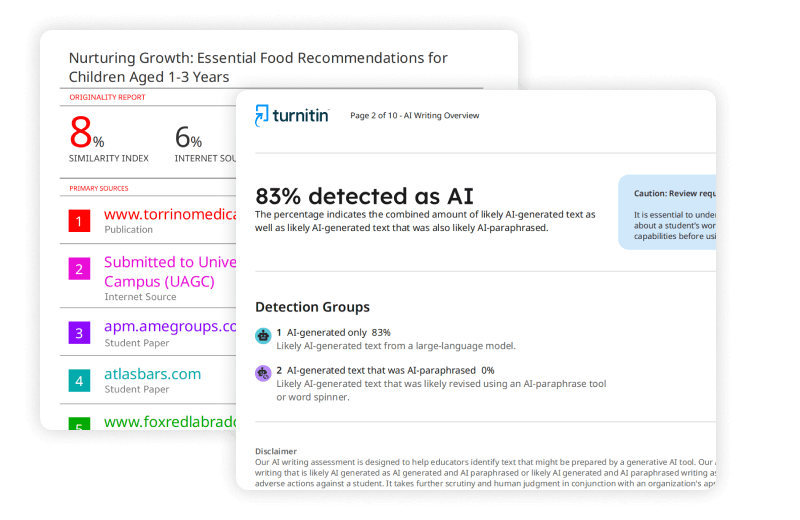
This tool provides a percentage score separate from the similarity score. While the similarity score might show 10% because of properly cited quotes, the AI score tells the instructor how much of the original text appears to be AI-generated. This distinction helps maintain academic honesty while acknowledging that some level of similarity is normal in research papers.
Understanding Turnitin AI Detection for Students
The way Turnitin ai detection for students works can vary based on school policy. In many cases, instructors choose to keep the AI score hidden from students. This can be frustrating if you want to verify your work before the final deadline. However, some professors enable the option for students to see their own reports.
If you have access to the report, you will see highlights in your text where the Turnitin ai detector for students identified potential AI use. These highlights are usually a different color than the plagiarism highlights. If you wrote the essay yourself but still see flags, it might be due to a very formal writing style or the use of heavy templates. In these instances, you should talk to your instructor about how you gathered your information and drafted your work.
Can Students Access Turnitin’s AI Checker?
A common question among learners is: can students access Turnitin’s AI checker? Directly, the answer depends on your institution’s subscription and the specific settings of your assignment. Turnitin is primarily a tool sold to schools and teachers, not directly to individual students.
You cannot simply go to the website and pay for a single check of the Turnitin ai detection tool. You must be part of a class. However, many students look for a Turnitin ai checker for students free through their university library or writing center. Many universities provide a “sandbox” or “draft” folder where you can submit work to see your similarity and AI scores before your final submission. Check your school’s library website to see if they offer this service.
Turnitin AI Checker Free: Are There Alternatives?
Searching for a Turnitin ai checker free often leads to third-party websites. Be careful with these. Most free tools online are not as accurate as the official Turnitin software. Turnitin uses a massive database of student papers that other tools cannot access.
If you want a Turnitin ai checker for students free, your best bet is always your school. If your school does not provide a draft area, you can use other reputable AI detectors to get a general idea of how your writing looks to an algorithm. Just remember that the official ai detector essay Turnitin uses is the one your professor will see, and other tools might give different results.
Can I Use Turnitin AI Checker If My Work is Plagiarism?
You might wonder, can I use Turnitin AI checker if my work is plagiarism? It is important to understand that the AI checker and the plagiarism checker are two different systems working together. If you copy a paragraph from a website, the similarity report will find it. If you ask an AI to rewrite that paragraph, the turn it in ai checker will likely flag it as AI-generated.
Using AI to hide plagiarism is a risky strategy. The Turnitin ai detection system is designed to catch exactly that kind of behavior. Instead of trying to bypass the system, use Turnitin as a tool to improve your writing. Use the reports to see where you forgot to cite a source or where your writing style became too mechanical.
| Feature | Plagiarism Checker | AI Writing Detector |
| Primary Goal | Finds matching text in databases | Identifies AI-generated patterns |
| Source Type | Websites, Journals, Other Papers | Large Language Models (LLMs) |
| Score Type | Similarity Percentage | AI Probability Score |
| Student Access | Usually visible if teacher allows | Often restricted to teachers |
Interpreting the AI Detector Essay Turnitin Results
When an instructor looks at an ai detector essay Turnitin report, they see more than just a number. They see a breakdown of which sections look human and which look generated. A high percentage does not always mean a student cheated. For example, if you include a long list of technical definitions or a very rigid bibliography, the system might flag those as AI-like because they lack human-like variation.
If your score is high, don’t panic. Be prepared to show your rough drafts, your browser history, or your notes. Most instructors use the Turnitin ai detection checker as a starting point for a conversation rather than an absolute proof of misconduct. They look for a mismatch between your previous writing style and the style found in the current assignment.
Troubleshooting Your Turnitin Login Student Issues
Sometimes, your Turnitin login student credentials simply will not work. This often happens at the start of a new semester. If you see an “Invalid Email or Password” error, try resetting your password using the link on the login page. Make sure you use the email address associated with your school account.
If the site says your account does not exist, you might not have been added to the class yet. Contact your instructor and ask them to check the roster. If you are using a mobile device, the interface can sometimes be glitchy. It is always better to perform your Turnitin login student tasks on a desktop or laptop computer to ensure all features load correctly.
The Role of AI Detection in Modern Education
The rise of Turnitin ai detection for students reflects a change in how we think about writing. It is no longer just about who owns the words, but who performed the labor of putting them together. When you use the Turnitin ai detector for students, you are participating in a system that values human thought and effort.
While the tools are powerful, they are not perfect. Educators know that false positives happen. This is why you should always write in a way that reflects your unique voice. Use AI for brainstorming or organizing your thoughts, but do the actual writing yourself. This ensures that when you perform your Turnitin login student and check your report, you can be confident in the results.
Why Accuracy Matters in Turnitin AI Detection
The company claims a very high accuracy rate for its turn it in ai checker. They report a 98% confidence level in identifying AI-written text. This high bar is meant to protect students from false accusations. They would rather miss some AI text than falsely flag a human-written paper.
However, the remaining 2% represents a margin of error. If you are a non-native English speaker, you might find that the Turnitin ai detection checker flags your work more often. This happens because non-native speakers sometimes use more formal, structured language that can mimic AI patterns. If this applies to you, keep your early drafts. Showing the evolution of your essay is the best way to prove the work is yours.
Best Practices for a Clean Turnitin Report
To make sure your Turnitin login student experience is stress-free, follow these tips:
- Avoid AI Paraphrasers: Tools that “spin” text to avoid plagiarism detectors often trigger the ai detector essay Turnitin flags. These tools create unnatural patterns that are easy for the software to spot.
- Cite Everything: Even if you use an AI to help you find a source, you must cite the original source correctly.
- Write in One Place: If you use Google Docs or Microsoft Word, the version history serves as excellent proof of your work. If your Turnitin ai detection score is high, you can show how the document grew over several days.
- Read Aloud: Before submitting, read your essay out loud. If it sounds robotic to you, it might look robotic to the Turnitin ai detector for students.
Frequent Questions About Turnitin and AI
Does Turnitin save my paper in a database?
Yes, most institutional settings save your paper to a private database. This prevents other students from copying your work in the future. If you submit a paper for one class and then submit the same paper for a different class later, the Turnitin login student portal will flag it as self-plagiarism.
Can I delete a submission?
Generally, students cannot delete their own submissions. You must contact your instructor to have a paper removed so you can re-upload a new version. This is why you should double-check your file before hitting the final submit button.
How long does the report take?
Usually, the similarity and AI reports are ready within ten to fifteen minutes. During busy times, like finals week, it might take several hours. If you are resubmitting a paper, Turnitin has a built-in 24-hour delay before generating a new report for that specific assignment. This is to prevent students from “gaming” the system by making small changes repeatedly.
Moving Forward with Your Academic Career
Understanding the Turnitin login student process is a fundamental skill for the modern student. It is about more than just avoiding trouble; it is about learning how to present your research and ideas clearly. As the Turnitin ai detection tools become more advanced, the value of your original voice increases.
Use the feedback you receive through the portal to grow as a writer. Whether it is a comment on your grammar or a note about your citations, this information helps you improve. The what is Turnitin AI checker question is ultimately about maintaining the value of your degree. When everyone does their own work, the grades you earn truly reflect your abilities.
Always stay informed about your school’s specific policies regarding Turnitin ai detection for students. Some departments might allow AI for research while others ban it entirely. Knowing these rules before you start writing will save you time and stress when it comes time to log in and submit your final draft.
Final Thoughts on Turnitin AI Tools
The introduction of the Turnitin ai detection checker changed the academic environment. It created a new layer of accountability. For the honest student, this is a good thing. It ensures that those who put in the hard work of writing and researching are not unfairly compared to those who generate work with a single prompt.
As you navigate your Turnitin login student account this year, remember that the software is a tool, not an enemy. It provides a way to verify your integrity and improve your scholarly writing. Keep your login details secure, submit your work early, and always strive for original thought. This approach will lead to success throughout your academic career and beyond.
LET US HUMANIZE YOUR PAPERS – No Plagiarism Guarantee!
Need assistance with your writing? Look no further! Our team of skilled writers is prepared to provide you with prompt writing help. Rest assured, your work will be entirely original and free from any plagiarism, as we offer a guarantee against it. Experience swift and dependable writing assistance by reaching out to us today!
Top-Rated AI Text Humanizer | GET Flawless content for All Your PROJECTS!